Grab your team’s attention with @mentions

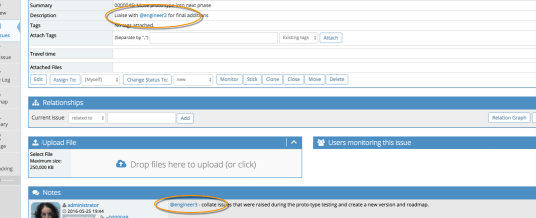
MantisHub’s latest update has a few hidden gems. One of our favorites is support for @ mentions to loop in your co-workers or customers into conversations around issues. This will triggering notifications that they are mentioned in issues or associated notes.
mention1

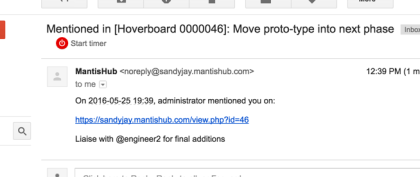
In line with what all the other cool services are doing (twitter, github, etc) you simply type @joe (where ‘joe’ is the username) in an issue summary, description or a note. Joe will be emailed the note with a link to the issue and content where they were referenced, providing context of what they are being asked to respond to.
mention_email

The email notifications for mentions has a distinguished subject, so you won’t miss out on items that you need to action.  The feature is also extra useful when mentioning someone that wouldn’t have otherwise even got a notification about your new note or issue.

Great right!?

For @ mentions to work for you team, you should follow these guidelines for usernames:

  • Don’t use email addresses as usernames. Note that if you use a snappy & short username, login with their email address will still work!
  • Don’t use spaces in user names.

More details in our KB article.

Using Toggl for time tracking? It just got better!


toggl_logo “Toggl’s time tracker is built for speed and ease of use. Time keeping with Toggl is so simple that you’ll actually use it.”

The folks at Toggl have created a simple and fast time tracking feature. For companies that need to match time spent against issues, projects and users, Toggl makes it super easy to record and report on time spent.

So MantisHub have just rolled out a new integration with Toggl to put this great tool at your fingertips. Simply install the Toggl chrome extension and you can now record your time when working on an issues with just a click. Continue reading “Using Toggl for time tracking? It just got better!”

Walking you Through Getting Started

For those of you who have already signed up for a free trial, here’s a tip to get you going.

If you log into your new trial and head to your ‘My View’ page we have a little getting started video guide for first-time users. It covers the steps involved to get projects going and create issues.

If you’re tired of reading and you just want someone to tell you how to do it, we just put together a little walk-through video for you. Go ahead and check it out! Continue reading “Walking you Through Getting Started”

Email Training Course

We know you’ve probably got a long list of possible issue and bug trackers that you could use and may have already signed up for a bunch of trials. We want to help you out!

Now when you sign up for our free trial, you’ll automatically be subscribed to our 10-day email training program to walk you through everything you need to know to determine if MantisHub is for you. We’ll cover the basic getting started tasks, our great features and plugins, customization options and much more.  You’ll also have the opportunity to take advantage of our special offers! Continue reading “Email Training Course”

Harnessing the power of MantisHub API

MantisHub provides several possibilities for connecting with other systems.  Whether it is through email reporting, CSV import/export, or through its API.  Among these, the API is the most powerful and automation-friendly way to extend MantisHub.

So if you are a developer, the API will enable you to create great end-to-end scenarios.  Whether it is to auto-create issues for build failures, crashes in production, or sending daily reports based on pre-defined filters.

To make this easier, we have created client libraries that provides an easy way to leverage the API.  We’ve open sourced these libraries and made them available through our github organization.

So whatever integration or automation scenario you have in mind, checkout out our API.

The possibilities are endless…

Turbo charge your team’s productivity with MantisHub. Get going in less than 2 Minutes.

For some companies a simple bug tracking tool without the hassle and complexity of installing, maintaining and supporting it in-house is the best fit. Some companies just want to get up and running now, while keeping their team focused on their business!  If a cloud solution is the best fit for you, take a look at MantisHub.

Utilizing the great features and usability of the highly popular MantisBT, MantisHub offers a bug and issue tracking software service solution so you can avoid the setup and maintenance overhead.

When you sign up with MantisHub for your issue tracking needs, what you’ll get is: Continue reading “Turbo charge your team’s productivity with MantisHub. Get going in less than 2 Minutes.”

December ’15 updates

In December we rolled out a bunch of new updates including:

  • Using API Tokens to access MantisHub for enabling generation of tokens to be used by services and apps to connect to MantisHub without sharing user’s passwords.
  • Understanding Email Notifications via EventLog Plugin – often actual email notifications are different from administrators expectations due to MantisHub config or user preferences.  Installing this plugin helps administrators figure out the reason why users get or don’t get notified about a change.
  • Support for issue notes as a column that can be selected via Manage Columns.  The typical usage would be to export issue notes to CSV or Excel.
  • Support for exporting billing information to CSV or Excel, providing users with the ability to edit the information in Excel before sending to clients.
  • Custom field “required on resolve” wasn’t being enforced.
  • Disallow deletion / disabling of last administrator to make sure administrators can’t lock themselves out.
  • Fix for email notifications on update where email notifications on issue updates were not triggered when email notification configurations were overriden.
  • MantisTouch was updated with several fixes and improvements.

We would like to take this opportunity to wish all our users a Happy new year.  Best wishes for 2016.

MantisTouch v1.3.3 released

A new release of MantisTouch has been published with following improvements.

Features

  • Support date custom field

Fixes

  • mcrypt_encrypt(): Key of size 9 not supported by this algorithm
  • Users get treated as readonly if they login with wrong username case
  • Add wsdl file locally to avoid hangs and improve performance vs loading it remotely

Localization

  • Added German localization
  • Added Dutch localization
  • Some UI strings were not localized

MantisHub users already got the update.  Others can download it from the same URL they got at purchase.

All MantisTouch v1.2.0 users are encouraged to upgrade by downloading new package and copying over existing installation.  For instances older than v1.2.0, checkout the v1.2.0 release post for upgrade instructions.