Understanding Email Notifications via EventLog Plugin

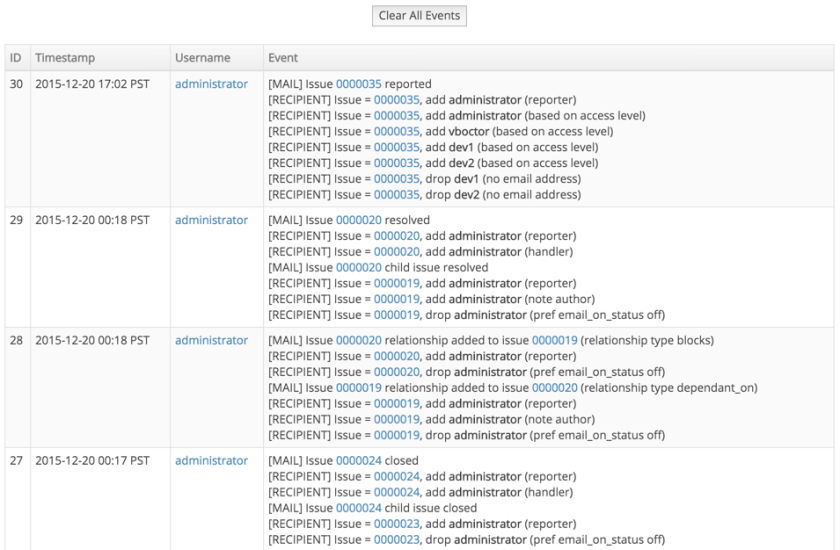
Often users are not sure why user X did or didn’t receive an email notification about an action on issue Y.  We have added support for EventLog plugin which when installed helps answering this question by showing the action, its timestamp, who triggered the action, the high level description, and why users were added or removed from the notification list.

To install the plugin, administrators can go to Manage – Manage Plugins and click the install link next to the EventLog plugin.  This will start the process or recording such diagnostic information.  Once done, you can go to the same place and uninstall the plugin.

If the behavior is different than you expect, then it will likely be due to configuration or user preferences.  Feel free to contact support for help.

Here is a screenshot showing some sample output for the EventLog plugin that administrators can access by going to Manage – Event Log.

eventlog_screenshot

Using API Tokens to access MantisHub

API tokens provide users with more control, convenience, visibility and security when providing other services and apps access to their MantisHub.

Here are some of the benefits of API tokens compared to use of passwords:

  • Tokens are 32 characters long and cryptographically secure, hence, they are much more secure than user passwords.
  • Tokens are generated by MantisHub, hence, they are not going to be shared passwords with any other internet services that the users use.
  • Users have visibility on when each token was last used to access MantisHub.
  • Users can revoke one of the tokens without impacting others.  Hence, can selectively deny access to specific services.
  • Users can change their passwords without affecting the validity of the API tokens.

Users can generate API tokens via their My Account – API tokens.  The tokens are only displayed once and should be used for one integration.  The tokens can be passed in the password field when calling the MantisHub APIs.  Note that it can’t be used to login via the MantisHub login page.

Providing visibility into plan usage

MantisHub now has a new feature to keep you across your MantisHub usage as well as the status of your plan.

If you’re wondering how many team members, issues or projects you have, administrators can now readily access that information via your ‘Manage’ page. Continue reading “Providing visibility into plan usage”

Commenting on Issues via Email Released as Preview

We have just rolled out the preview version of the “reply to comment” feature.  Responding to MantisHub notifications is now as simple as replying from within your favorite email client.  Such replies will be added as comments/notes on the issue.

It is also very easy to involve others in the conversations by just adding them to the to/cc field of the reply.  This way as email participants are having the conversations, the conversation messages are being recorded on the issue.

For more details about the feature checkout the feature documentation.

Looking forward for your feedback.

MantisHub + Slack == More productive team!

Slack Logo

Slack is a platform for team communication: everything in one place, instantly searchable, available wherever you go.

We are big fans of Slack and believe that it is an effective tool for connecting the team with realtime chat and updates from the services they depend on.  We believe it is a great companion service to MantisHub with a great free plan to get MantisHub users started.

Setting up Mantishub + Slack Integration

Setting up Slack integration with MantisHub is pretty easy.  Start with creating an incoming webhook integration in Slack and use the provided webhook URL to include the MantisHub plugin settings.

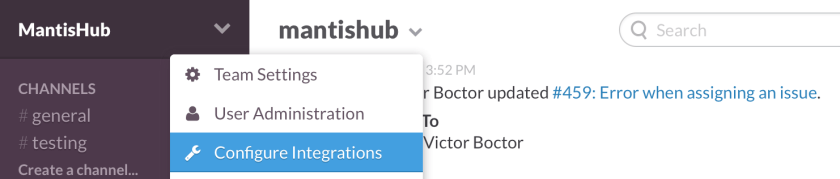
Select “Configure Integrations” from Slack
screenshot_2015-02-21_22-33-03

Select “Incoming WebHooks” as the integration type.  Then following the steps until Slack provides the webhook url.  Copy the URL and save the integration details.

screenshot_2015-02-21_22-31-34

Go to Manage – Manage Plugins – click install button next to Slack then click on the Slack hyperlink.  This will prompt the form below to provide the Slack incoming webhook URL, select the native and custom fields to include in the Slack notifications (assuming they are not empty) and map project names to Slack channels.  If a project is mapped to an empty channel name, then notifications will be disabled for that project.  Default channel will be used for new projects created in the future, unless they are explicitly mapped via the same form.

screenshot_2015-02-21_14-50-50

Testing the Slack integration

Once done configuring the integration from both Slack and MantisHub sides, use the “Update and Test” button which will trigger a Slack notification like the one below in the default channel.

screenshot_2015-02-21_14-38-30

Sample Notifications

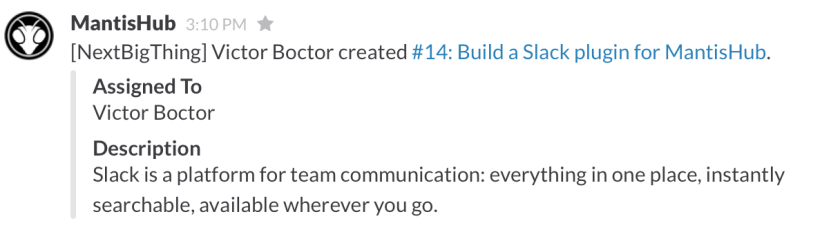
This is a sample notification when an issue is created:
screenshot_2015-02-21_15-10-30

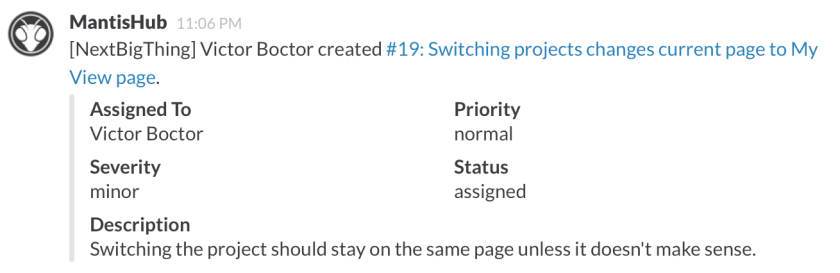
Another issue creation sample with more fields selected to be included:
screenshot_2015-02-21_23-06-47

This is a sample notification when a team member assigns an issue to themselves:

screenshot_2015-02-21_15-13-18

This is a sample notification when a team member assigns an issue to another team member:

screenshot_2015-02-21_15-51-10

screenshot_2015-02-21_22-20-08

This is a sample notification when a user adds a private note:

screenshot_2015-02-21_22-21-36

Announcing MantisHub Modern UI

We just rolled out the new MantisHub release featuring our brand new modern UI.  The new UI is based on Bootstrap and provides MantisHub with a fresh modern look.

Administators will have the ability to switch between modern and classic UI via the Manage page.  The switch will apply to apply to all users for that MantisHub.

b8q96ojcuaaxdah

At the moment, the modern UI is only available via MantisHub, with the plan to integrate into Mantis Bug Tracker version 2.0.

Timeline feature for MantisHub


timeline

MantisHub has recently rolled out the new timeline feature to all users.  This feature enables users to get a glimpse of the activity that is happening around them, whether it is by team mates or customers.  The timeline enables users to navigate to the associated part of the tracker to get further details on such activity.  Users only see activity related to artifacts that they have access to.

Introducing MantisHub – MantisBT as a Service

MantisBT has been known for being easy to setup across a variety of platforms due to it being a PHP app that is designed to reduce installation friction.  However, often users wanted a quicker way of getting started.  They didn’t want to worry about setting up a web server, installing MantisBT, managing it, doing backups, upgrades, and being on point to answer support questions.

As a first step, we offered one-click installs for MantisBT.  That helped customers to get started quicker, but they still had to worry about security patches, upgrades and support.

I’ve been working on making this better for a while, and I’m now happy to announce the launch of MantisHub.  MantisHub is for MantisBT what GitHub is for Git.  It is MantisBT as a service.  Allowing users to signup and be up and running in less then 1 minute.  They can then try MantisBT for a month and then decide whether they want to continue using it or not.  No credit card required until the end of the trial period.

MantisHub also offers MantisTouch for mobile access.  Allowing your users to get a mobile friendly interface when accessing your MantisBT instance from any modern phone.  Just visit http://yourmantishub.mantishub.com/m/ to get the MantisTouch interface.  This is a $100 value.

Through running MantisHub service, the experience of running MantisBT at scale will provide good insights and customer feedback loop that will translate into contributions to MantisBT open source project.