Pages + Issue Tracking + Helpdesk = The Dream Team for Success


Today, we are up-leveling MantisHub Team Collaboration with Integrated Wiki, Issue Tracking, and Helpdesk solutions. We’re excited to announce the release of MantisHub Pages! This integrated Markdown Wiki combines the power of a collaborative wiki platform with robust issue tracking and helpdesk capabilities, creating a unified solution that will transform how your team works.

The Power of Integration: Why Pages, Issue Tracking, and Helpdesk Work Better Together

In today’s fast-paced environment, teams need more than just a tool to track issues; they need a dynamic space where knowledge is easily accessible, decisions are documented, and everyone is on the same page. That’s where MantisHub Pages comes in. We call it the “We Space” for your team.

MantisHub Pages is an advanced markdown wiki tool that enables teams to create and collaborate on content all in one place. When integrated with issue tracking, this tool becomes even more powerful:

  • Internal Knowledge Base: You can link issues to detailed documentation, meeting notes, project plans, and more. This centralizes all the information your team needs, reducing the time spent searching for context and ensuring everyone can access the most up-to-date information.
  • Support Knowledge Sharing: Support agents can leverage Pages’ articles to help address customer inquiries and find answers faster. Additionally, agents can contribute to the knowledge base, ensuring that the most common questions are documented and easily accessible.
  • Software Development: Developers can create detailed technical documentation, link it to relevant issues, and track the project’s progress. This ensures that everyone, from engineers to stakeholders, understands the project’s direction and decisions made along the way.
  • Project Management: Project Managers can use Pages to document project plans, timelines, and milestones. By linking these directly to issues, they can track progress and adjust plans in real-time, ensuring that the project stays on course.
  • Enhanced Collaboration: MantisHub’s issue tracking is designed to help teams manage their work efficiently. When you add Pages to the mix, team members can collaborate on requirements, write specs, and document decisions directly linked to the issues in MantisHub. This seamless collaboration ensures that all team members, whether developers, designers, or project managers, are aligned and informed.
  • Streamlined Processes: Pages article content can be turned into actionable tasks. For example, a detailed product spec in Pages can be broken down into issues, ensuring no details are missed, and the workflow is smooth from planning to execution.

A Unified Solution for Team Success

Integrating Pages, Issue Tracking, and Helpdesk is more than just a set of tools; it’s a comprehensive solution that empowers teams to work smarter, collaborate better, and achieve more. By bringing together a wiki, issue tracking, and helpdesk, we’ve created a platform where knowledge flows seamlessly, work is managed efficiently, and teams can focus on what they do best.

We’re thrilled to bring Pages to MantisHub users and can’t wait to see how your team will use it to drive success. If you’re ready to take your team’s collaboration to the next level, explore MantisHub Pages today!

Check out our knowledge base for more details.
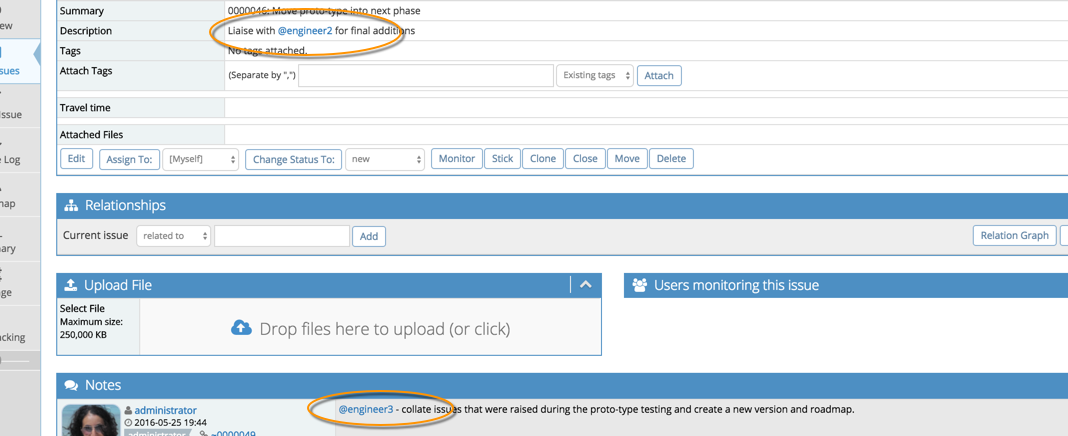
Grab your team’s attention with @mentions

MantisHub’s latest update has a few hidden gems. One of our favorites is support for @ mentions to loop in your co-workers or customers into conversations around issues. This will triggering notifications that they are mentioned in issues or associated notes.

mention1

In line with what all the other cool services are doing (twitter, github, etc) you simply type @joe (where ‘joe’ is the username) in an issue summary, description or a note. Joe will be emailed the note with a link to the issue and content where they were referenced, providing context of what they are being asked to respond to.

mention_email

The email notifications for mentions has a distinguished subject, so you won’t miss out on items that you need to action.  The feature is also extra useful when mentioning someone that wouldn’t have otherwise even got a notification about your new note or issue.

Great right!?

For @ mentions to work for you team, you should follow these guidelines for usernames:

  • Don’t use email addresses as usernames. Note that if you use a snappy & short username, login with their email address will still work!
  • Don’t use spaces in user names.

More details in our KB article.

Harnessing the power of MantisHub API

MantisHub provides several possibilities for connecting with other systems.  Whether it is through email reporting, CSV import/export, or through its API.  Among these, the API is the most powerful and automation-friendly way to extend MantisHub.

So if you are a developer, the API will enable you to create great end-to-end scenarios.  Whether it is to auto-create issues for build failures, crashes in production, or sending daily reports based on pre-defined filters.

To make this easier, we have created client libraries that provides an easy way to leverage the API.  We’ve open sourced these libraries and made them available through our github organization.

So whatever integration or automation scenario you have in mind, checkout out our API.

The possibilities are endless…

December ’15 updates

In December we rolled out a bunch of new updates including:

  • Using API Tokens to access MantisHub for enabling generation of tokens to be used by services and apps to connect to MantisHub without sharing user’s passwords.
  • Understanding Email Notifications via EventLog Plugin – often actual email notifications are different from administrators expectations due to MantisHub config or user preferences.  Installing this plugin helps administrators figure out the reason why users get or don’t get notified about a change.
  • Support for issue notes as a column that can be selected via Manage Columns.  The typical usage would be to export issue notes to CSV or Excel.
  • Support for exporting billing information to CSV or Excel, providing users with the ability to edit the information in Excel before sending to clients.
  • Custom field “required on resolve” wasn’t being enforced.
  • Disallow deletion / disabling of last administrator to make sure administrators can’t lock themselves out.
  • Fix for email notifications on update where email notifications on issue updates were not triggered when email notification configurations were overriden.
  • MantisTouch was updated with several fixes and improvements.

We would like to take this opportunity to wish all our users a Happy new year.  Best wishes for 2016.

MantisTouch v1.3.3 released

A new release of MantisTouch has been published with following improvements.

Features

  • Support date custom field

Fixes

  • mcrypt_encrypt(): Key of size 9 not supported by this algorithm
  • Users get treated as readonly if they login with wrong username case
  • Add wsdl file locally to avoid hangs and improve performance vs loading it remotely

Localization

  • Added German localization
  • Added Dutch localization
  • Some UI strings were not localized

MantisHub users already got the update.  Others can download it from the same URL they got at purchase.

All MantisTouch v1.2.0 users are encouraged to upgrade by downloading new package and copying over existing installation.  For instances older than v1.2.0, checkout the v1.2.0 release post for upgrade instructions.

Understanding Email Notifications via EventLog Plugin

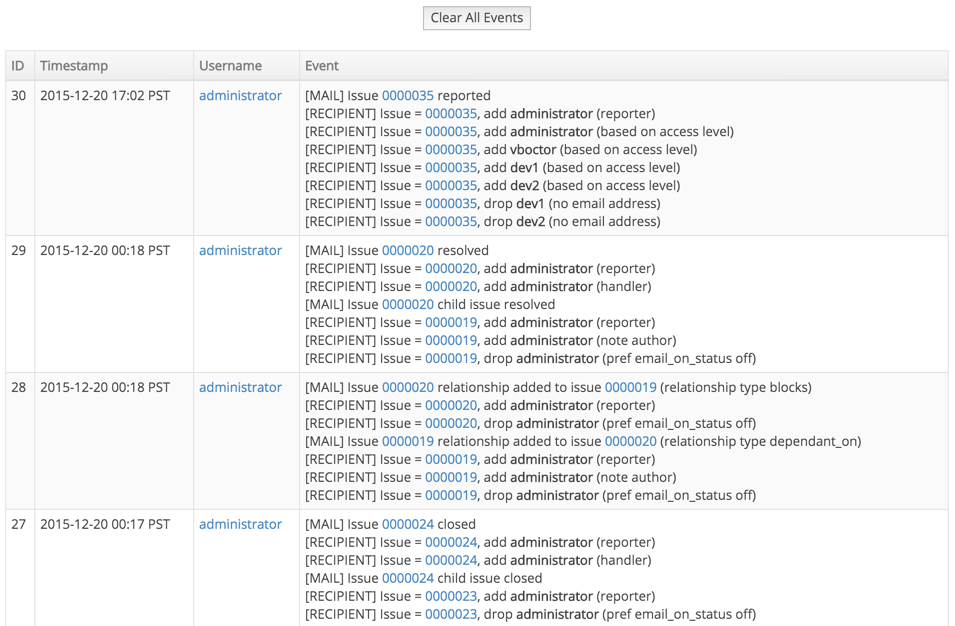
Often users are not sure why user X did or didn’t receive an email notification about an action on issue Y.  We have added support for EventLog plugin which when installed helps answering this question by showing the action, its timestamp, who triggered the action, the high level description, and why users were added or removed from the notification list.

To install the plugin, administrators can go to Manage – Manage Plugins and click the install link next to the EventLog plugin.  This will start the process or recording such diagnostic information.  Once done, you can go to the same place and uninstall the plugin.

If the behavior is different than you expect, then it will likely be due to configuration or user preferences.  Feel free to contact support for help.

Here is a screenshot showing some sample output for the EventLog plugin that administrators can access by going to Manage – Event Log.

eventlog_screenshot

Using API Tokens to access MantisHub

API tokens provide users with more control, convenience, visibility and security when providing other services and apps access to their MantisHub.

Here are some of the benefits of API tokens compared to use of passwords:

  • Tokens are 32 characters long and cryptographically secure, hence, they are much more secure than user passwords.
  • Tokens are generated by MantisHub, hence, they are not going to be shared passwords with any other internet services that the users use.
  • Users have visibility on when each token was last used to access MantisHub.
  • Users can revoke one of the tokens without impacting others.  Hence, can selectively deny access to specific services.
  • Users can change their passwords without affecting the validity of the API tokens.

Users can generate API tokens via their My Account – API tokens.  The tokens are only displayed once and should be used for one integration.  The tokens can be passed in the password field when calling the MantisHub APIs.  Note that it can’t be used to login via the MantisHub login page.

Commenting on Issues via Email Released as Preview

We have just rolled out the preview version of the “reply to comment” feature.  Responding to MantisHub notifications is now as simple as replying from within your favorite email client.  Such replies will be added as comments/notes on the issue.

It is also very easy to involve others in the conversations by just adding them to the to/cc field of the reply.  This way as email participants are having the conversations, the conversation messages are being recorded on the issue.

For more details about the feature checkout the feature documentation.

Looking forward for your feedback.

MantisHub Support Portal

We’ve just launched our new support portal to replace our blog and docs sections of our website.  The new support portal provides several benefits to our customers like:

Search – Search is now a core feature of our documentation, providing customers with the ability to easily find the answer to their questions.

Conversations – Customers can engage with contents, ask questions, provide feedback, etc.  This wasn’t easy before in the context of existing documentation.

Voting – Customers can thumbs up / down an article to give us feedback on whether they found it helpful or not.

Sharing to social networks – Customers can now easily share our blogs and articles to their preferred social networks including Facebook, Twitter, LinkedIn and Google+.

Support portal integration in in-app support – Our in-app support widget, which is now visible in the “Manage” section of your MantisHub, starts off with providing answers from our documentation which may answer the user’s questions right there.  If that is not the case, then the questions are sent to our support team that would then respond.

Reducing friction for publishing – With the new portal, we have simplified our process for publishing new content.  Hence, with that we should be publishing more content quicker, providing more customers with instant answers.

Let us know your thoughts about both the content and infrastructure.  We are always looking for ways to simplify our offering and get customers productive and focused on their projects.

MantisHub + Slack == More productive team!

Slack Logo

Slack is a platform for team communication: everything in one place, instantly searchable, available wherever you go.

We are big fans of Slack and believe that it is an effective tool for connecting the team with realtime chat and updates from the services they depend on.  We believe it is a great companion service to MantisHub with a great free plan to get MantisHub users started.

Setting up Mantishub + Slack Integration

Setting up Slack integration with MantisHub is pretty easy.  Start with creating an incoming webhook integration in Slack and use the provided webhook URL to include the MantisHub plugin settings.

Select “Configure Integrations” from Slack

screenshot_2015-02-21_22-33-03

Select “Incoming WebHooks” as the integration type.  Then following the steps until Slack provides the webhook url.  Copy the URL and save the integration details.

screenshot_2015-02-21_22-31-34

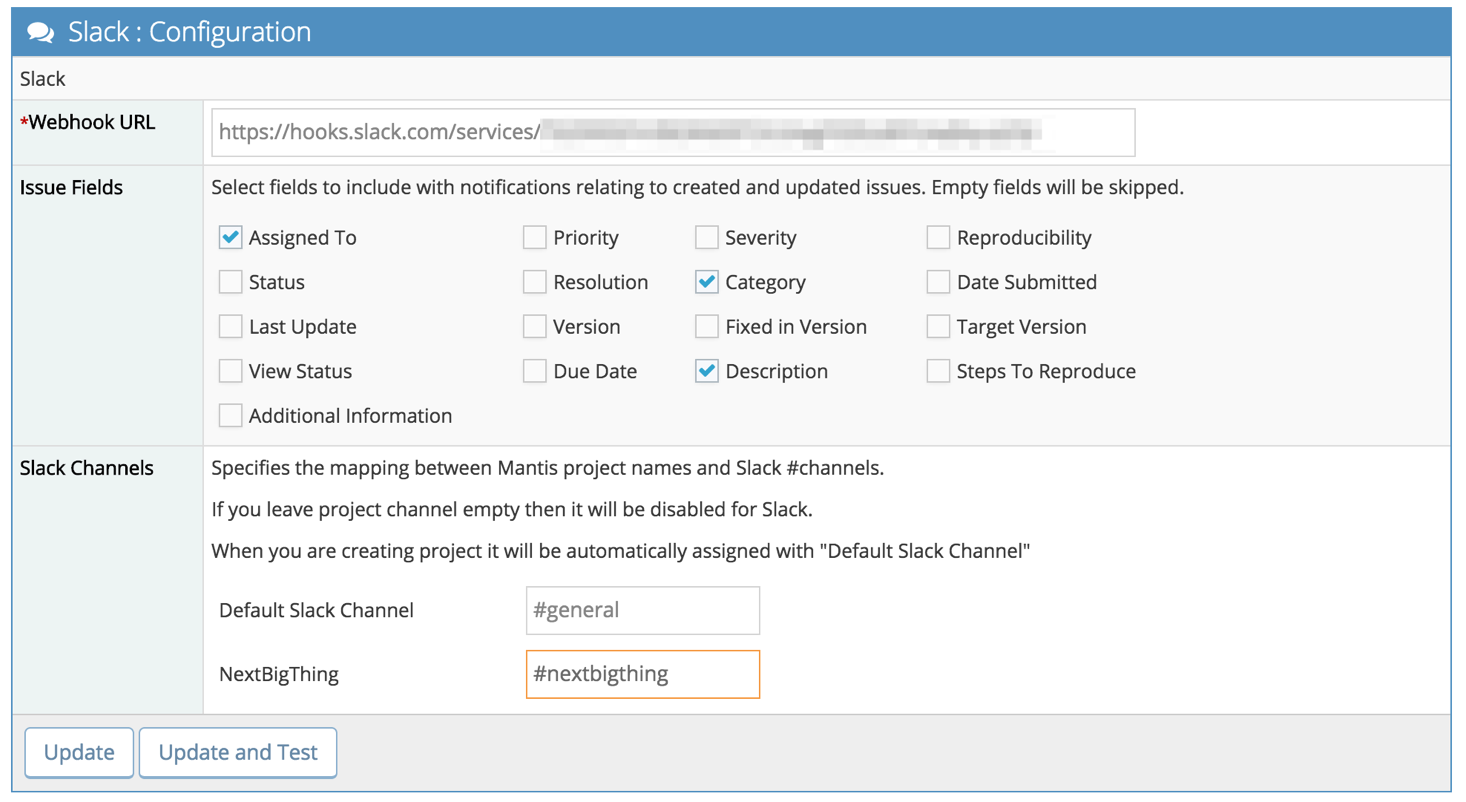
Go to Manage – Manage Plugins – click install button next to Slack then click on the Slack hyperlink.  This will prompt the form below to provide the Slack incoming webhook URL, select the native and custom fields to include in the Slack notifications (assuming they are not empty) and map project names to Slack channels.  If a project is mapped to an empty channel name, then notifications will be disabled for that project.  Default channel will be used for new projects created in the future, unless they are explicitly mapped via the same form.

screenshot_2015-02-21_14-50-50

Testing the Slack integration

Once done configuring the integration from both Slack and MantisHub sides, use the “Update and Test” button which will trigger a Slack notification like the one below in the default channel.

screenshot_2015-02-21_14-38-30

Sample Notifications

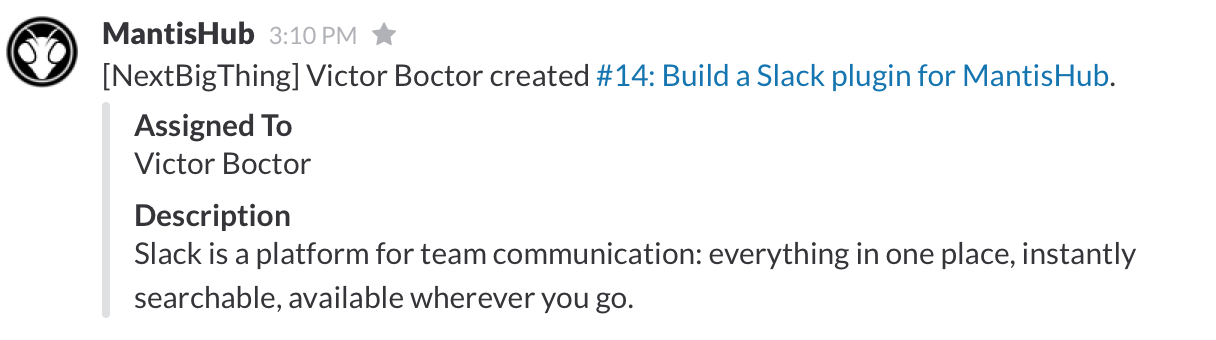
This is a sample notification when an issue is created:

screenshot_2015-02-21_15-10-30

Another issue creation sample with more fields selected to be included:

screenshot_2015-02-21_23-06-47

This is a sample notification when a team member assigns an issue to themselves:

screenshot_2015-02-21_15-13-18

This is a sample notification when a team member assigns an issue to another team member:

screenshot_2015-02-21_15-51-10

screenshot_2015-02-21_22-20-08

This is a sample notification when a user adds a private note:

screenshot_2015-02-21_22-21-36